
From the exports you already have
No integration project. Your engineers export from your CAMO and operations systems as Excel or CSV, and import the files in the platform. Every value is checked, duplicates are skipped, and every import can be undone.
Four files give you the reliability report
Import the aircraft list first: every other file refers to aircraft by registration. Then utilisation, the technical log and component removals. Add the rest when you have them; each one switches on more of the platform.
- AircraftOne row per aircraft
- UtilisationDaily or monthly hours and cycles
- Technical logEvery write-up and its rectification
- Component removalsOne row per removal
- Then the restDelays, catalogue, engines, checks, flights
Twelve record types, a template for each
Download the Excel template for any of them from the Data page, or use your own export: columns are matched for you.
| Record | What it holds | Used by |
|---|---|---|
| Aircraft | One row per aircraft. Import this first. | All |
| Utilisation, daily | Flight hours and cycles per aircraft per day; ground days marked (A, C, out-of-phase, AOG, storage). | Reliability Parts |
| Utilisation, monthly | Monthly totals per aircraft, as printed in most reliability reports. | Reliability Parts |
| Technical log | Every pilot, maintenance, cabin and inspection write-up with its rectification. | Reliability |
| Component removals | One row per removal: part number, serial, reason, shop finding, time since installation and cost if you have them. | Parts Reliability |
| Removal counts per part number | Monthly counts when individual removals aren't available. Your CAMO system's pivot export is read as it is. | Parts |
| Delays and cancellations | Every delay over your threshold and every cancellation, with the delay code and, for technical ones, the ATA chapter. | Reliability |
| Part catalogue | Quantity per aircraft, costs, turnaround time and stock per part number. | Parts |
| Checks and ground time | A-checks, C-checks, out-of-phase work, AOG and storage periods. | Reliability |
| Engine events | Unscheduled engine removals, in-flight shutdowns and engine changes. | Reliability |
| EGT margin | EGT margin readings per engine serial, from engine condition monitoring. | Reliability |
| Flights | One row per flight with fuel burn; take-off weight and landing fuel make the analysis much sharper. | Fuel |
Seven steps, a few minutes per file
The file is read in your browser. Only the columns you map are sent to the server.
Say what the file is
Pick one of the twelve record types.
Drop the file
Excel or CSV. Choose the sheet if there are several.
Check the columns
The header row is found and columns are matched by name and common synonyms. Re-match any column, or give one value for every row.
Confirm dates and numbers
Day or month first, decimal point or decimal comma: both guessed from the data, both changeable. Durations can be minutes or hours and minutes.
Preview
See the rows as they will be saved.
Import
In chunks with a progress bar: rows saved, duplicates skipped, every problem listed by row.
Undo if needed
Every import is in the history, and undo removes every row it added.
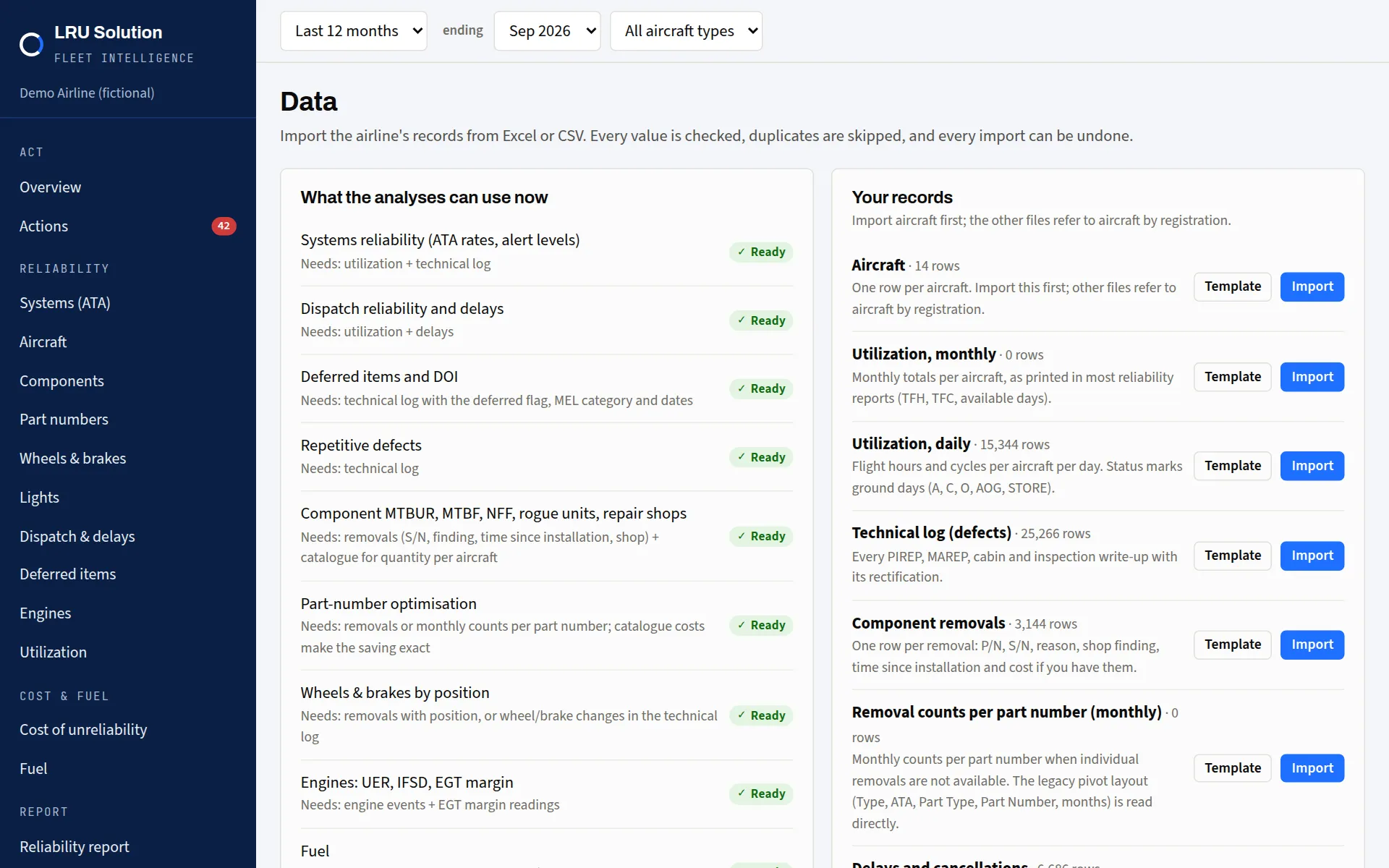
The Data page on the demo airline: each analysis shows what it needs and whether it's ready.
Switch on what your data allows
| Analysis | Needs |
|---|---|
| Systems reliability ATA rates, alert levels | Utilisation and technical log |
| Dispatch reliability and delays | Utilisation and delays |
| Deferred items and DOI | Technical log with the deferred flag, MEL category and dates |
| Repetitive defects | Technical log |
| Component reliability MTBUR, MTBF, NFF, rogue units, repair shops | Removals with serial, finding, time since installation and shop, plus the catalogue for quantity per aircraft |
| Part-number optimisation | Removals or monthly counts per part number; catalogue costs make the saving exact |
| Wheels and brakes by position | Removals with position, or wheel and brake changes in the technical log |
| Engines UER, IFSD, EGT margin | Engine events and EGT margin readings |
| Fuel | One row per flight with fuel burn; take-off weight and landing fuel make it sharper |
| Cost of unreliability | Removals with cost or the catalogue, delays, flights, and your cost settings |
Make the figures yours
Your own cost figures
Delay minute, cancellation, labour rate and fuel price. Until you enter them, example values are flagged on every screen.
Your reliability programme
Alert method, baseline months, recalculation interval, alert rule, repetitive-defect rule, dispatch target and delay threshold, as approved for your programme.
Owners, engineers, viewers
Owners manage users and settings, engineers import and work the actions, viewers read and ask. Each airline sees only its own records.
How much history, and the limits
- Six months of history gives the first alert levels; the default baseline is the previous twelve months. Part-number comparisons look back 36 months.
- Rates need utilisation: defects imported without hours give counts but no rates.
- MTBF needs shop findings on at least half the removals; otherwise MTBUR is shown.
- The fuel model needs flight-level burn; without take-off weight it uses flight time only, which is weaker.
- MEL category A limits aren't computed, because they're item-specific.
Read how we handle your data, or ask us anything about your exports.